Build a RAG Document Ingestion Pipeline with OCR and PDF APIs
Build a traceable RAG document ingestion pipeline that converts images and PDFs into normalized text, metadata, searchable chunks, and cited answers.
Build a RAG Document Ingestion Pipeline with OCR and PDF APIs
A reliable retrieval-augmented generation system starts before retrieval. Scanned images, PDFs, reports, and screenshots must first become structured artifacts that can be validated, chunked, indexed, refreshed, and traced back to their sources.
This guide builds that ingestion path with GuGuData’s current OCR, PDF-to-text, PDF-summary, knowledge-base upload, and knowledge-base chat endpoints. The goal is not to send an opaque file directly to a model. It is to create an observable pipeline in which every answer can retain document, page, and chunk provenance.
Review the current contracts in the GuGuData OpenAPI document before integrating them into production.
The ingestion architecture
The original workflow below illustrates the broad agent pattern: detect the input type, extract content, normalize it, and prepare it for retrieval.

The implementation view makes the artifact boundaries explicit. Extraction output is not yet a trusted knowledge base: it still needs normalization, chunk metadata, access rules, and failure handling.
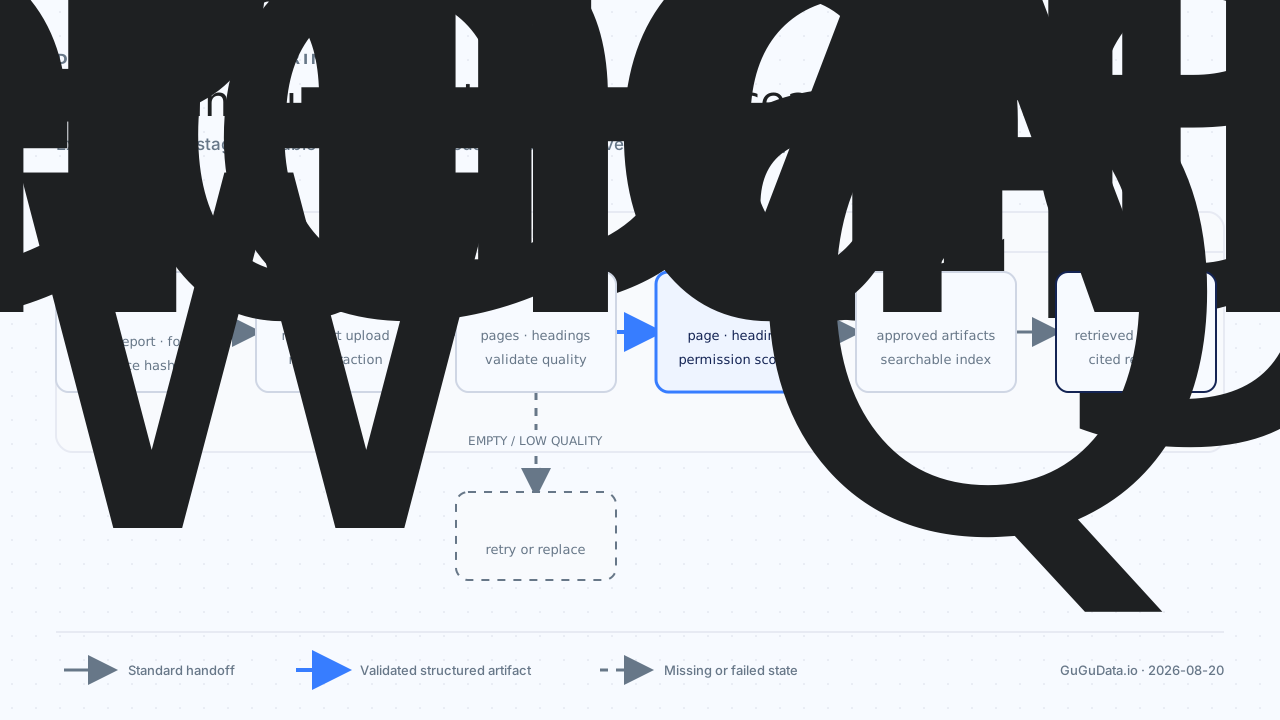
Choose the extraction endpoint by input type
Use the endpoint that matches the source format instead of forcing every document through the same converter.
| Input | Method and endpoint | Required file field | Pipeline role |
|---|---|---|---|
| Image or scan | POST /v1/imagerecognition/ocr |
imagefile |
Extract text from image-based content. |
POST /v1/imagerecognition/pdf2text |
file |
Convert a PDF into text for validation and chunking. | |
POST /v1/imagerecognition/pdf-summary |
file |
Generate optional document-level summary metadata. |
The public detail pages are Image OCR, PDF to Text, and PDF Summary. All three endpoints authenticate with an appkey query parameter and accept multipart form data.
Extract text from an image
curl -X POST \
  "https://api.gugudata.io/v1/imagerecognition/ocr?appkey=YOUR_APPKEY" \
  -F "imagefile=@./scanned-page.png"
Extract text from a PDF
curl -X POST \
  "https://api.gugudata.io/v1/imagerecognition/pdf2text?appkey=YOUR_APPKEY" \
  -F "file=@./report.pdf"
Generate document-level summary metadata
curl -X POST \
  "https://api.gugudata.io/v1/imagerecognition/pdf-summary?appkey=YOUR_APPKEY" \
  -F "file=@./report.pdf" \
  -F "lang=en"
lang is optional for PDF summaries and currently defaults to en. Treat the summary as a navigation and discovery aid, not as a replacement for the extracted source text.
Normalize before you chunk
OCR and PDF conversion produce extraction artifacts. A separate normalization stage should make those artifacts stable enough for indexing.
Recommended operations include:
- Preserve page numbers and the source file identifier.
- Join line breaks that were introduced by page layout while retaining paragraph boundaries.
- Remove repeated headers, footers, and watermarks only when the rule is deterministic.
- Record empty pages and low-text pages instead of silently dropping them.
- Compute a source hash before indexing so duplicate uploads and later revisions can be detected.
Keep the original extracted text alongside the normalized version. This gives reviewers a way to distinguish an upstream recognition issue from a later cleanup or chunking issue.
Design chunks as traceable records
A chunk should carry enough context to support retrieval, authorization, and citations.
| Field | Purpose |
|---|---|
document_id |
Stable identifier in your application. |
source_hash |
Detects duplicate uploads and content changes. |
source_file |
Human-readable source reference. |
page_start and page_end |
Connects a chunk to its original pages. |
heading_path |
Retains section context. |
chunk_id |
Uniquely identifies the retrievable unit. |
text |
Stores normalized source content. |
access_scope |
Applies authorization before retrieval. |
extracted_at |
Supports freshness and audit checks. |
Avoid splitting only by a fixed character count. Prefer headings, paragraphs, list boundaries, and table boundaries, then apply a size ceiling. A small overlap can preserve continuity, but excessive overlap creates duplicate retrieval results and unnecessary token usage.
Upload approved documents to a knowledge base
GuGuData also exposes a knowledge-base document endpoint:
POST /ai/knowledge-bases/{knowledge_base_id}/documentsThe request uses multipart form data, an appkey query parameter, and one or more repeated files fields. The current OpenAPI contract documents up to five files per request and up to 20 MB per file. Optional fields include tenant_id, metadata, and replace_existing.
curl -X POST \
  "https://api.gugudata.io/ai/knowledge-bases/KNOWLEDGE_BASE_ID/documents?appkey=YOUR_APPKEY" \
  -F "files=@./approved-report.pdf" \
  -F 'metadata={"source":"research-library","language":"en"}' \
  -F "replace_existing=false"
Uploading to a managed knowledge base and maintaining your own chunk index are two valid but distinct designs. If you upload the original file, keep your own source hash and authorization record so the application can still decide whether the document should be available to a given user.
Retrieve only after ingestion succeeds
The knowledge-base chat endpoint is:
POST /ai/knowledge-bases/{knowledge_base_id}/chat/completionsIt accepts a JSON body with messages. The current contract also exposes optional controls such as thread_id, tenant_id, stream, and top_k.
curl -X POST \
  "https://api.gugudata.io/ai/knowledge-bases/KNOWLEDGE_BASE_ID/chat/completions?appkey=YOUR_APPKEY" \
  -H "Content-Type: application/json" \
  -d '{
    "messages": [
      {"role": "user", "content": "Which controls does the report recommend?"}
    ],
    "stream": false,
    "top_k": 5
  }'
Do not make a document retrievable while it is partially processed. A practical state model is received, extracting, needs_review, ready_to_index, indexed, and failed. Apply access controls before retrieval, rather than filtering sensitive passages after an answer has already been generated.
Failure handling and observability
An ingestion worker should fail closed when extraction is incomplete. It should never invent missing document text or mark an empty conversion as indexed.
Track at least these signals:
| Signal | Why it matters |
|---|---|
| Conversion status | Separates extraction failures from indexing failures. |
| Extracted text length by page | Highlights blank pages and poor scans. |
| Chunk count by document | Detects abnormal splitting or empty output. |
| Source hash and revision | Prevents accidental duplicate indexing. |
| Processing duration by stage | Locates slow conversion or indexing steps. |
| Retrieval source coverage | Checks whether answers retain usable evidence. |
For HTTP handling, treat 429 as a capacity boundary and retry conservatively after the applicable limit window. Retry transient 500 and 503 responses with bounded backoff. Do not retry malformed 400 requests without correcting the input, and keep the application key in a trusted server-side environment.
Implementation checklist
- Validate extension, content type, and file size before upload.
- Store the original file, its hash, and the extraction result as separate artifacts.
- Keep page and heading provenance through normalization and chunking.
- Route empty or low-quality extraction results to review.
- Generate summaries as metadata, never as a substitute for source text.
- Apply tenant and document permissions before retrieval.
- Return source references with answers and log the retrieved chunk IDs.
- Re-index only when the source hash or processing rules change.
FAQ
Should I use OCR for every PDF?
No. Use PDF-to-text for PDFs that the endpoint can parse, and reserve image OCR for image inputs and scan-oriented workflows. Preserve the input type and extraction method in metadata so failures can be diagnosed later.
Can a PDF summary be indexed as the whole document?
It can be useful as document-level metadata, but it should not replace the full extracted text. Retrieval needs the underlying passages to support specific, attributable answers.
Should the ingestion agent generate an answer when extraction fails?
No. Mark the document as failed or requiring review. Generating an answer without a validated source artifact breaks the evidence chain that RAG is intended to provide.
Where should chunk-level authorization run?
Before retrieval results reach the model. Document and tenant permissions should limit the candidate set, while chunk metadata preserves the context required for citations.
Related GuGuData guides
Explore the current API catalog at GuGuData.io.