Build a Verifiable Web Evidence Archive with HTML, PDF, and Screenshot APIs
Build a verifiable web evidence archive that captures screenshots, static HTML, PDF or Word exports, domain context, hashes, and immutable metadata.
Build a Verifiable Web Evidence Archive with HTML, PDF, and Screenshot APIs
A URL is not an archive. Pages can change, disappear, redirect, or load different content later. A defensible web evidence record needs the captured page, a human-reviewable rendering, acquisition metadata, domain context, cryptographic hashes, and an append-only version history.
This guide combines GuGuData’s current website metadata, DNS, SSL, WHOIS, screenshot, static HTML, PDF, and Word endpoints into a repeatable capture workflow. It focuses on public pages and transparent failure states; authenticated or blocked pages should move to an approved manual process rather than being treated as successful captures.
Check the current GuGuData OpenAPI document before implementation because request contracts can evolve.
Evidence archive architecture
The original workflow shows the broad capture and export sequence.

The data-flow view below separates acquisition artifacts from the hash manifest and archive boundary. The manifest describes the evidence; it does not replace the captured files.
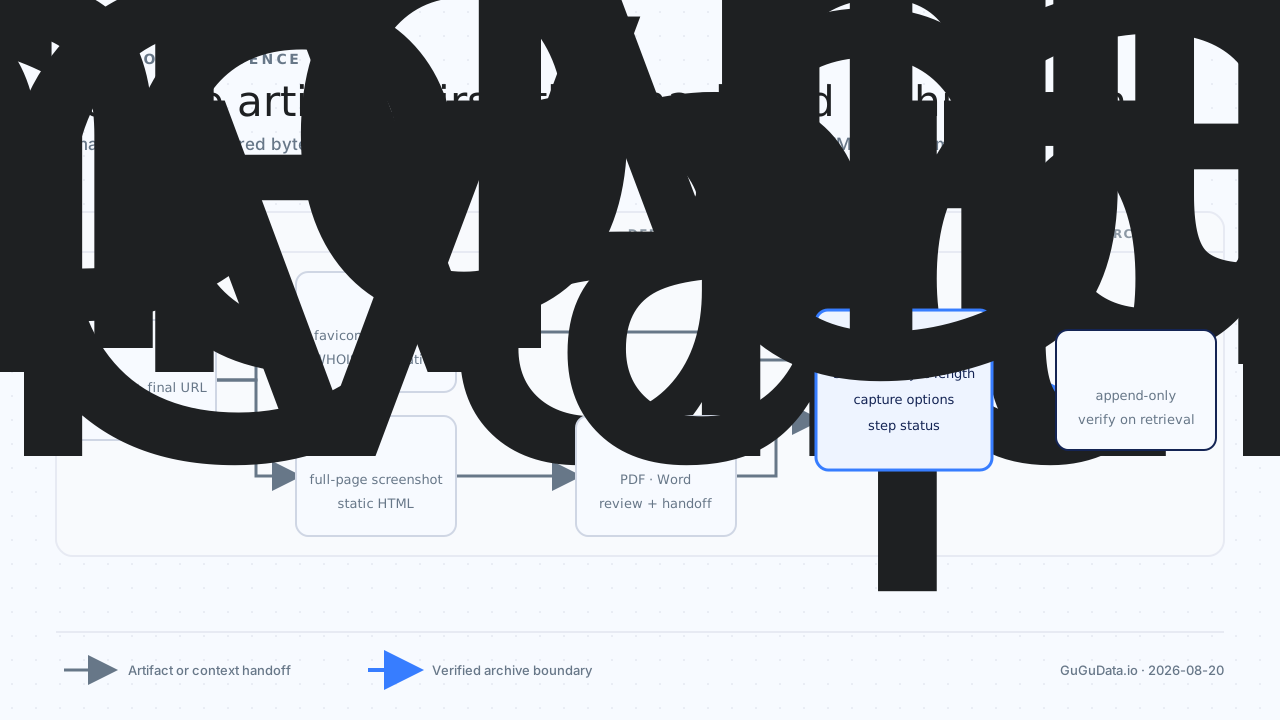
Use the current io endpoints
| Stage | Method and endpoint | Required input | Output role |
|---|---|---|---|
| Site metadata | GET /v1/websitetools/favicon |
url |
Capture title and favicon context. |
| DNS | GET /v1/websitetools/dns-lookup |
domain |
Record resolution context. |
| SSL | GET /v1/websitetools/sslcertinfo |
domain |
Record certificate context. |
| WHOIS | GET /v1/websitetools/whois |
domain |
Record registration context. |
| Screenshot | POST /v1/websitetools/url2snapshot |
JSON url |
Capture visual state and returned HTML content. |
| Static HTML | POST /v1/websitetools/url2html |
JSON url |
Create a reprocessable HTML artifact. |
POST /v1/imagerecognition/html2pdf |
JSON type and content |
Create a fixed-layout review artifact. | |
| Word | POST /v1/imagerecognition/html2word |
type and content |
Create an optional editable document. |
All endpoints require an appkey query parameter. Keep the key in a trusted server-side capture worker and redact it from request logs and manifests.
Capture site and domain context
Start by normalizing the source URL and extracting its host. Then collect site metadata and domain observations.
curl -G "https://api.gugudata.io/v1/websitetools/favicon" \
  --data-urlencode "appkey=YOUR_APPKEY" \
  --data-urlencode "url=https://example.com/announcement"

curl -G "https://api.gugudata.io/v1/websitetools/dns-lookup" \
  --data-urlencode "appkey=YOUR_APPKEY" \
  --data-urlencode "domain=example.com"

curl -G "https://api.gugudata.io/v1/websitetools/sslcertinfo" \
  --data-urlencode "appkey=YOUR_APPKEY" \
  --data-urlencode "domain=example.com"

curl -G "https://api.gugudata.io/v1/websitetools/whois" \
  --data-urlencode "appkey=YOUR_APPKEY" \
  --data-urlencode "domain=example.com"
The relevant public detail pages are Website Metadata and Favicon, DNS Lookup, SSL Certificate Audit, and WHOIS Monitoring.
These observations add context but do not prove page content. Store their acquisition times separately because domain data and page capture may be sampled at different moments.
Capture a screenshot and HTML snapshot
The Webpage Screenshot Capture API accepts JSON. url is required; the current contract also documents responseFormat, fullPage, width, height, deviceScaleFactor, userAgent, and isMobile.
curl -X POST \
  "https://api.gugudata.io/v1/websitetools/url2snapshot?appkey=YOUR_APPKEY" \
  -H "Content-Type: application/json" \
  -d '{
    "url": "https://example.com/announcement",
    "responseFormat": "base64",
    "fullPage": true,
    "width": 1920,
    "height": 1080,
    "deviceScaleFactor": 1,
    "isMobile": false
  }'
Save the screenshot bytes exactly as received after decoding when necessary. Record the requested viewport and rendering options in the manifest so later reviewers know what the image represents.
Use the URL to Static HTML API for a separate HTML artifact:
curl -X POST \
  "https://api.gugudata.io/v1/websitetools/url2html?appkey=YOUR_APPKEY" \
  -H "Content-Type: application/json" \
  -d '{"url":"https://example.com/announcement"}'
Static HTML is valuable because it remains machine-readable and can be reprocessed later. A screenshot preserves appearance; HTML preserves structure. Keep both when the evidence requirement justifies it.
Create PDF or Word derivatives
Derivatives improve review and handoff, but they are not the acquisition source. Generate them from the captured URL or approved HTML and link them back to the same archive version.
The HTML/URL to PDF API accepts JSON with required type and content, plus optional landscape:
curl -X POST \
  "https://api.gugudata.io/v1/imagerecognition/html2pdf?appkey=YOUR_APPKEY" \
  -H "Content-Type: application/json" \
  -d '{
    "type": "URL",
    "content": "https://example.com/announcement",
    "landscape": 0
  }'
The HTML to Word API requires type and content; filename is optional. The current OpenAPI request body is application/json.
curl -X POST \
  "https://api.gugudata.io/v1/imagerecognition/html2word?appkey=YOUR_APPKEY" \
  -H "Content-Type: application/json" \
  -d '{
    "type": "url",
    "content": "https://example.com/announcement"
  }'
Word is editable, so treat it as a convenience derivative rather than immutable evidence. Hash it and record its relationship to the source capture if it is retained.
Build a hash manifest
Hash every stored artifact after final byte serialization. The manifest should include enough data to reproduce the acquisition context and verify that stored bytes have not changed.
| Field | Purpose |
|---|---|
archive_id and version |
Identify an immutable capture event. |
source_url and final_url |
Retain the requested and resolved locations. |
captured_at |
Record the acquisition timestamp with timezone. |
http_status |
Record transport evidence when available. |
capture_options |
Retain viewport and rendering configuration. |
artifacts |
List file name, media type, byte length, and SHA-256 hash. |
site_context |
Reference favicon, DNS, SSL, and WHOIS observations. |
step_statuses |
Expose complete, partial, failed, or blocked stages. |
from hashlib import sha256
from pathlib import Path


def artifact_digest(file_path: Path) -> str:
    """Return the SHA-256 digest for an archived artifact."""
    digest = sha256()
    with file_path.open("rb") as artifact:
        for block in iter(lambda: artifact.read(1024 * 1024), b""):
            digest.update(block)
    return digest.hexdigest()
Sign or protect the manifest according to your evidence policy. Hashes detect later byte changes, but they do not by themselves prove who performed the capture or whether the original page was authentic.
Preserve version and failure boundaries
Never overwrite an earlier capture with a retry. Create a new version with its own acquisition time and hashes. A retry may observe a changed page, so replacing the first attempt would erase useful evidence.
Use explicit task states:
complete: required artifacts and manifest were produced.partial: at least one artifact exists, but another required stage failed.failed: no usable capture artifact was produced.blocked: authentication, access policy, or page behavior prevented automated capture.
If a page requires login, presents a challenge, or prohibits capture, stop the automated workflow. Record the boundary and route the URL to an authorized manual process. Do not describe an empty screenshot or error document as a successful archive.
Storage and retention controls
- Store artifacts under an immutable archive version.
- Separate raw captures from PDF and Word derivatives.
- Restrict write access and log every manifest update.
- Verify hashes during retrieval and scheduled integrity checks.
- Retain the source URL, redirects, timestamps, and capture configuration.
- Apply retention and deletion rules appropriate to the archived material.
- Avoid capturing personal or restricted content without a valid basis and policy.
FAQ
Is a screenshot enough for a web evidence archive?
Usually not. It preserves appearance but not searchable structure, links, or machine-readable content. Pair it with static HTML and a manifest when those properties matter.
Why store both the original URL and final URL?
Redirects are part of the observation. Keeping both makes it possible to explain where the capture request started and which page was ultimately rendered.
Does a SHA-256 hash prove that a webpage was authentic?
No. It proves that the stored artifact still matches the bytes that were hashed. Authenticity also depends on acquisition controls, timestamps, source context, and access governance.
What should happen when only the screenshot succeeds?
Mark the archive version partial, retain the screenshot and its hash, and record which required artifacts failed. Do not silently promote a partial result to complete.
Related GuGuData guides
- Webpage screenshot capture API
- URL to static HTML API
- HTML or URL to PDF API
- Convert HTML to Word API
- Website metadata and favicon API
Explore the current API catalog at GuGuData.io.